In Sub contracting , if I have 2 BOM having same name, while doing PO, which BOM system will Pick?
If you have more than 1 BOM, then Verson has has to be created, which comes under Materil master in MRP4 view. Create Version1 for 1st BOM and Version2 for 2nd BOM and so on. This has to be updated in Info Record stating which Version you are going to use currently. This version field will come in Purchase Org Data Screen in Info Rec below tax code field and this info rec has to be created in Info category - SubContract. This version will be reflected in PO.
For a process orders, production orders and purchase orders,
the system will default to the first BOM in the Production Version list
on Workscheduling or MRP4 views.
For a sales order the system will default to the first
lowest numbered BOM found for the plant that the order is being generated
from, unless your SAP system is customized in some fashion
For example if you have 2 BOMs at plant 0011 and you want the system to always default to alt BOM #2 you will need to set the production version for alt #2 as the first option in the list... here is how I do mine...
A000 SUBCONTRACTOR
BOM ALT#2 Alt BOM = 2
A001 SUBCONTRACTOR
BOM ALT #1 Alt BOM = 1
How to get to the PV:
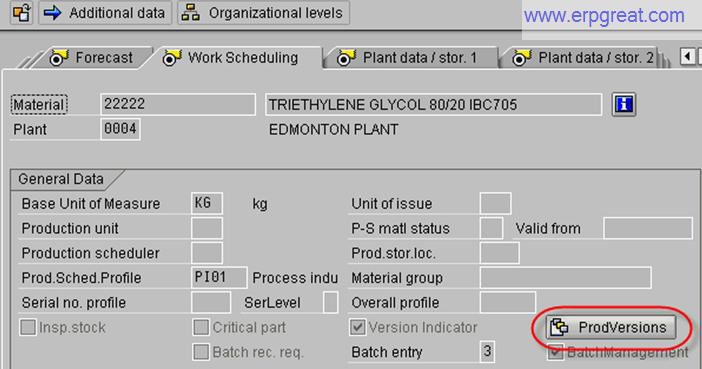
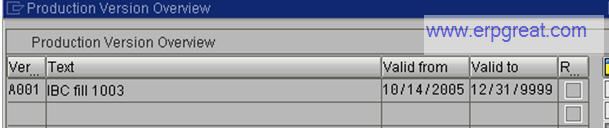
First column is your Version #, in the above exampe I
used A000 and A001
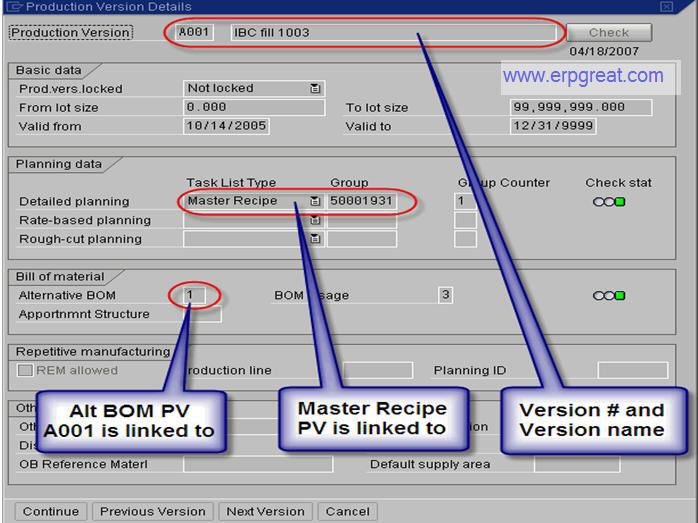
By double clicking on the Production version line you
can make changes to which BOM and Master Recipe the PV is linked to.
Note, typically a master recipe is not setup for subcontractor bom's, therefore I would clear this data out if the PV is sub-contractor packed.
Get help for your SAP MM problems
SAP MM Forums
- Do you have a SAP MM Question?
SAP MM Books
SAP
Material Management Certification, Interview and Configuration Reference
Books
SAP Material Management Tips
SAP MM Configuration
Tips and Materials Management Discussion Forum
Best regards,
SAP Basis, ABAP Programming and Other IMG Stuff
http://www.erpgreat.com
All the site contents are Copyright © www.erpgreat.com
and the content authors. All rights reserved.
All product names are trademarks of their respective
companies. The site www.erpgreat.com is in no way affiliated with
SAP AG.
Every effort is made to ensure the content integrity.
Information used on this site is at your own risk.
The content on this site may not be reproduced
or redistributed without the express written permission of
www.erpgreat.com or the content authors.