Overview
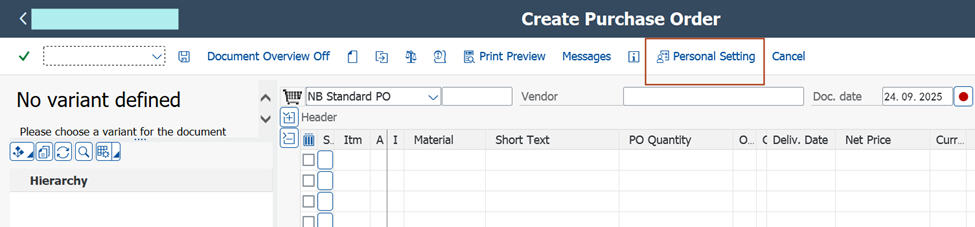
In SAP transaction ME21N, the Document Overview panel can be configured to appear or remain hidden by default based on your personal settings. The behavior is controlled by how ME21N stores your last-used layout in conjunction with your saved personal settings — no additional configuration or authorization is required.
To Disable Document Overview by Default
-
1
Open
ME21N. -
2
Click on
Document Overview Offto hide the pane. -
3
Go to
Personal Settings(usually via the top-right gear icon or menu). - 4 Save the settings without making any changes.
Verify: Exit and reopen ME21N to confirm that the Document Overview is now hidden by default.
To Enable Document Overview by Default
-
1
Open
ME21N. -
2
Click on
Document Overview Onto display the pane. -
3
Navigate to
Personal Settings. - 4 Save the settings without modifying anything.
- 5 Reopen ME21N to verify that the Document Overview now appears by default.
Screenshot — ME21N Document Overview