Consumption-based planning
Consumption-based planning (CBP) is used for manufacturing consumables such as cotton rags, screws, and grease.
Consumption-based planning procedures use historical consumption data to calculate future requirements through material forecasts or static planning procedures.
These procedures do not refer to the master plan. Independent and dependent requirements do not trigger the net requirements calculation. The calculation is triggered when stock falls below a reorder point or by forecast requirements calculated from past consumption.
Consumption-based planning is easy to use and requires little data.
MRP procedures
- Reorder point planning
- Forecast-based planning
- Time-phased planning
Configuration in SAP
-
Maintain plant parameters
OMI8 -
Maintain the MRP group
OPPRConsumption-based planning can also be used without MRP group settings.
Master data settings
- Maintain the material master with the MRP views.
- For manual reorder point planning, use MRP type
VBand lot sizeHBto replenish to the maximum stock level.
Standard MRP types for consumption-based planning also include V1, V2, and VM.
Manual reorder point example
With a reorder point of 5, a maximum stock level of 20, and current stock of 4, SAP creates a planning file entry when stock falls below the reorder point. The MRP run creates a procurement proposal for 16 units to replenish stock from 4 to 20.
Plant parameters and MRP group details
-
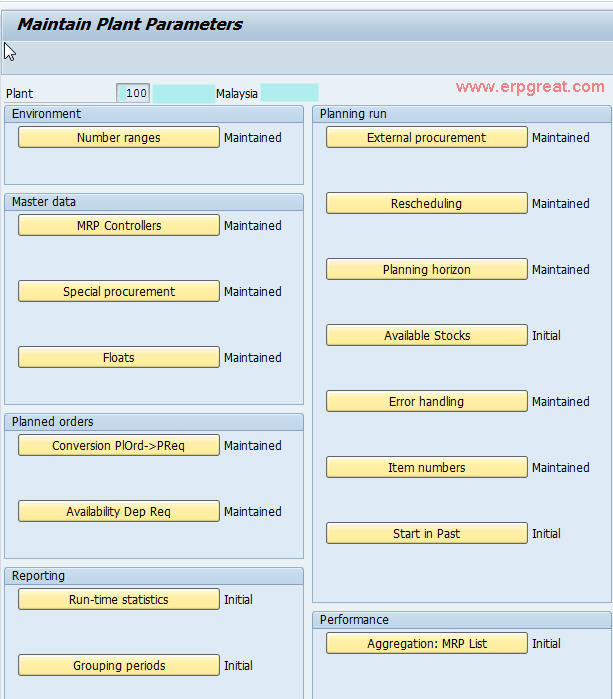
Plant parameters
OMI8Transaction
OMI8displays several configuration tabs. Many settings are mandatory. Maintain the settings relevant to your plant.- MRP controllers. Define controllers and assign them to plants. They are the planners responsible for the materials.
- Number ranges. Maintain number ranges for planned orders and purchase requisitions.
- Available stock. Specify whether to include stock in transit, blocked stock, and restricted stock.
- Planning horizon. With a planning horizon of 100 days, the MRP run plans within that horizon for materials with a planning file entry.
-
MRP group settings
MRP group configuration is optional. If you configure a new document type, enter it on the “External Procurement per MRP Group” tab. Assign the MRP group to the material master so SAP can select the document type based on that assignment.
Each tab serves a different configuration purpose.